SolidWorks is a popular CAD program. The latest version, SW2008 released in September , has several new features as well as new look. This article will explain the new and old sketch entities and options– polygon, arc, and point creation.
Introduction
SolidWorks2008 is a popular CAD tool, that is used by millions all around the world. The SW approach to 3D modeling is based on creating sketches and applying certain operations on them, creating “Features”. To ease the sketch creation, sketch entities were introduced.
Sketch Entities
As it was mentioned in previous articles once you enter the sketch , beside the “Exit Sketch” and “Smart Dimensions” buttons , you will see several predefined sketch entities.
Those entities are:
- Line
- Rectangle
- Polygon
- Circle
- Arc
- Sketch fillet/chamfer
- Spline
- Ellipse
- Point
- Text
Each entity has several options that appear in the place of feature tree once you have selected you choice – as described below. The line, circle and rectangle were cover in “Sketch entities overview – part I”. Now we move on to other options:
Polygon
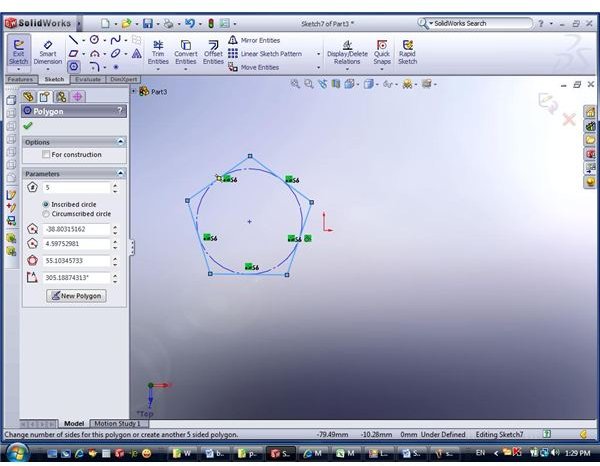
Polygon definition in SolidWorks 2008 is done by clicking on sketch plane as well as by entering its properties in the left part of the screen (“on top” of the Feature Tree area).
You have to create a polygon first and then edit its properties (only the number of forming lines can be entered prior to creation). Generally the polygon is defined by
- Number of bounding lines
- Center point coordinates
- Inscribed/circumscribed circle diameter
- Angle of a construction line (connecting the center point with one of the vertices) relative to the sketch plane X-axis
Arc
The arc can be defined by 3 different ways:
- Center and 2 points – click to indicate the location of arc center, click again to define starting point and radius and click for the third time to define arc length.
- 3 points – just point the 3 points that will define the arc
- Tangent – you can construct an arc that will be by definition tangent to certain straight line. In this case, your first selected point should be the endpoint of some sketch segment and the second point is arbitrary.
Point
Point is added to sketch in very easy manner - just click on certain place on the screen and a point will appear on the sketch plane. Those points can be used in future as reference to dimensions, holes etc.
This post is part of the series: CAD modelling with SolidWorks 2008
Are you a CAD user? An engineer? Product designer? What software do you use? Try SolidWorks - and you may never want to switch back… Already a SW user? This series will give you some useful tips about the latest version, SolidWorks 2008.
- CAD software - SolidWorks 2008 Overview
- Learning SolidWorks 2008 – Creating New Part and Menu Structure
- Learning SolidWorks 2008 – Creating a sketch
- Learning SolidWorks 2008 – Sketch Entities – Part I
- Learning SolidWorks 2008 – Sketch Entities – Part II
- Learning SolidWorks 2008 – Sketch Entities – Part III
- What’s new in SolidWorks 2008 – The view menu – part I
- What’s new in SolidWorks 2008 – The view menu – part II
- Learn SolidWorks 2008 – Extrude – part I
- Learn SolidWorks 2008 – Extrude – Part II
- Learn SolidWorks 2008 – Extrude – Part III
- Learn SolidWorks 2008 – Extrude – Part IV